
Shopify Color Families
Color families group raw product colors under a consistent parent color such as Red, Blue, or Mixed. This improves storefront filtering and helps AI Commerce Search understand the catalog more consistently.
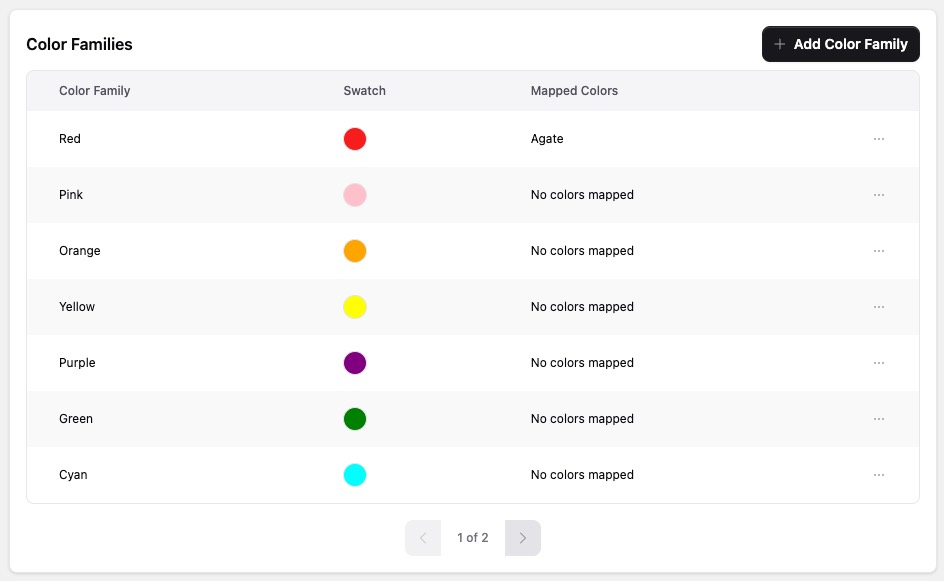
Why Use Color Families
Color families help merchants:
- Normalize inconsistent color names such as Burgundy, Wine, and Crimson
- Give shoppers cleaner and more predictable color filters
- Improve AI understanding of similar products
- Keep search and collection filtering easier to browse
Default Color Families
The Retail Cloud Connect Shopify App supports a recommended default set of 13 color families:
- Red
- Pink
- Orange
- Yellow
- Purple
- Green
- Cyan
- Blue
- Brown
- White
- Gray
- Black
- Mixed
Merchants can add the default set, edit it, or replace it with custom families.
Compound Color Values
The Color data settings control how compound values are split and mapped.
For example, White/Black produces the color values White and Black
when / is configured. Map every color part assigns both families, while
Map only the first color part assigns only White.
Mapping Workflow
- Configure the Color source, delimiters, and family mapping behavior under Filters & Data.
- Add the default families or create custom families.
- Open Enrichment to review coverage and, when available for the store, enable the automatic color family resolver.
- Review pending or unmapped colors. Assign a family manually, or use Predict Color Family when a suggestion is needed.
- In Colors & Swatches, click a Filter Swatch to edit an individual raw color, then select Save. Use Reset to inherit its family swatch again.
The color table shows discovered catalog colors, mapped families, automatic or manual provenance, pending colors, and AI-assisted suggestions. Use Accept Suggestion when a prediction is correct, or choose a different family manually. Automatic resolution preserves manual choices.
The Enrichment summary also distinguishes colors deliberately reviewed and left unmapped, so its mapping states add up to the discovered total. The resolver control shows both the saved configuration and whether automation is currently active. You can configure it before rollout; if it is inactive, the page identifies whether platform availability or the current plan is the blocker.
When an effective mapping changes, the app schedules a catalog refresh so AI Commerce Search receives the updated family values. A separate manual import is not required.
Filter swatches resolve in this order: an individual raw-color override, its mapped color family's swatch, then a labelled neutral gray fallback. Changes are applied only after selecting Save. Changing only a raw-color swatch updates storefront metadata immediately and does not schedule a catalog re-import.
Theme CSS can override a generated swatch or the neutral fallback without
!important:
.rcc-search [data-rcc-filter-swatch='colors:Ruby%20Red'] {
  --rcc-filter-swatch-color: hotpink;
}

.rcc-search {
  --rcc-filter-swatch-fallback: #eeeeee;
}
When to Customize the Defaults
Customize the defaults when:
- The catalog uses brand-specific color language
- Merchants want broader shopper-facing groups
- Merchants need to collapse seasonal names into stable merchandising colors
Use Color Families for color normalization. For non-color value normalization such as size abbreviations, use Merged Filter Values.