
Shopify Merged Filter Values
Merged Filter Values let merchants combine multiple raw attribute values into one shopper-facing filter value.
For example, Medium, M, and Med can all be shown as Medium on the storefront.
When to Use This
Use merged filter values when merchants need to:
- Normalize abbreviations
- Combine inconsistent vendor data
- Reduce duplicate filter choices
- Clean up large filters without editing source data in Shopify
How It Works
- Choose the attribute to merge.
- Create a Common Filter Option.
- Select the raw values that should roll up into that label.
- Run or wait for the next catalog import.
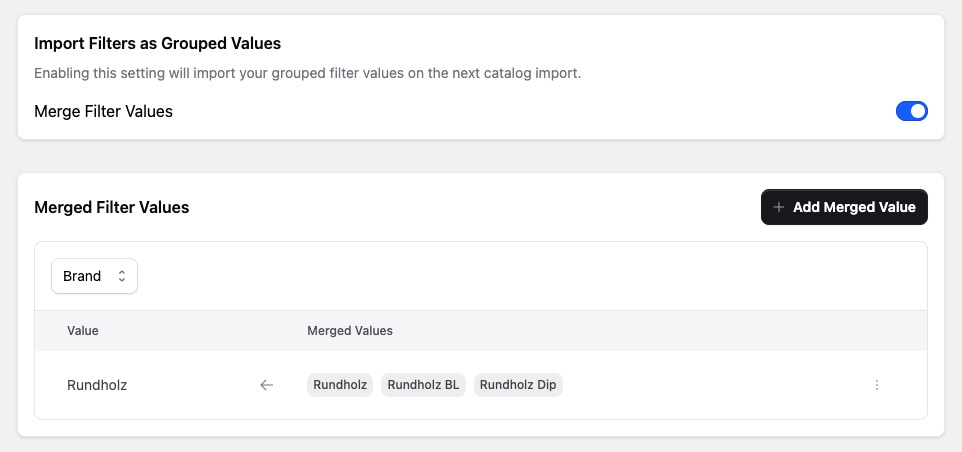
AI-Assisted Grouping
If an attribute does not have any merged values yet, the app can suggest groups with Predict Filter Groups.
This is useful for attributes that already contain obvious duplicates or alternate spellings.
Good Fit and Bad Fit
Merged Filter Values are a good fit for:
- Sizes
- Materials
- Finish names
- Style abbreviations
Use Color Families instead of merged filter values for colors.
Changing merged filter values affects imported filter data in Google Cloud. Expect the update to appear after the next catalog import, not instantly on the storefront.
Duplicate Labels
Do not create two common values with the same shopper-facing label for the same attribute. Duplicate labels can make filter counts and selected values confusing.
Numeric Attributes
Merged labels are text. Avoid merging numeric values that need numeric range behavior, because the grouped label may no longer work as a numeric slider value.